At Aspyn Information Services, we believe that the right tools make all the difference. For many of our developers and IT partners, Windows Subsystem for Linux (WSL) has become an amazing platform for maintaining a familiar Linux environment while keeping the ease of use of Windows. However, bridging the networking gap between your Windows host and the rest of your network can sometimes be tricky.
The challenge is that sometimes you want to access your quick-and-dirty web server from other locations on your network OTHER than the development machine itself.
If you are developing web applications using PHP, you are likely familiar with the built-in development server:
php -S 0.0.0.0:8000
This works perfectly if you are only testing from the machine you are working on. But what happens when you need to show your progress to a colleague, test on a mobile device, or verify integration from another point on your network? Because WSL runs as a separate VM, it sits behind a Network Address Translation (NAT) layer. By default, your Windows host knows about it, but the rest of your network is left in the dark.
The Solution: Windows Port Forwarding
To make your PHP web scripts reachable from other machines on your network, you need to tell Windows to listen for incoming traffic on a specific port and forward it to your WSL instance.
1. Get Your WSL IP Address
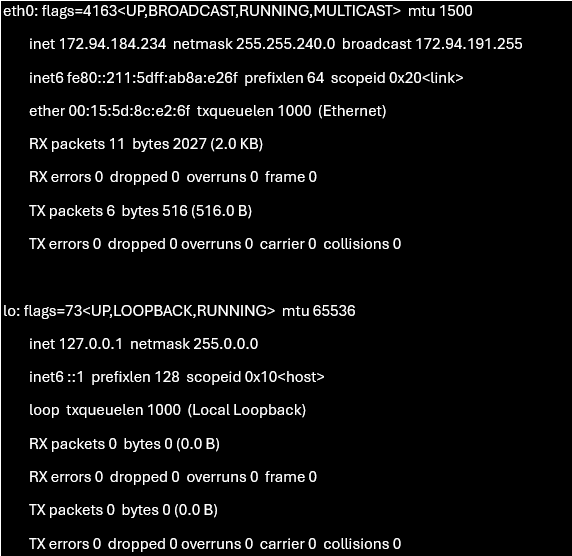
First, hop into your WSL terminal and find its current IP address:
ifconfig
You should be able to grab your inet address from the output (not localhost!).
Open your PowerShell as on your Windows host and run the following command to create the bridge:
netsh interface portproxy add v4tov4 listenport=8000 listenaddress=0.0.0.0 connectport=8000 connectaddress=
*Make sure to replace with the IP you retrieved earlier.*
Now, any traffic hitting your Windows host on port 8000 will be seamlessly forwarded into your WSL development environment, making your local project instantly accessible across your network.
***Please Note – this is a development and testing strategy ONLY and should not be used in a production environment or exposed to untrusted resources. The built-in PHP server should only be used for single-user dev and testing.
A Note on IT Strategy
Maintaining a clean development environment is only one part of the puzzle. At Aspyn, we focus on empowering Nanaimo businesses with robust, scalable IT infrastructure. Whether you are virtualizing legacy systems or exploring modern AI agent workflows, such as those using Hermes, our team is here to ensure your technology stack supports your goals.
Do you have any workflow or automation challenges you would like Aspyn to take a crack at? Contact Aspyn Information Services for affordable Managed IT Services, IT Support, Custom Scripting, and Process Streamlining!
