Aspyn Google Workspace Services for Nanaimo Businesses
Google Workspace is a lightweight, cloud-first productivity platform designed for businesses that prioritize simplicity, mobility, and real-time collaboration. It is especially well-suited for small to mid-sized organizations, field-based teams, and industries such as construction, trades, logistics, and service businesses where users frequently work across multiple locations and devices.
Built around familiar tools like Gmail, Google Drive, Docs, Sheets, Slides, Calendar and Google Meet, Google Workspace enables teams to communicate, store files, and collaborate without relying on traditional on-premise infrastructure. Everything is cloud-based, so users can securely access email, documents, and shared resources from a smartphone, tablet, or computer at any time. Google Workspace was previously known as G Suite and, before that, Google Apps for Your Domain.
Aspyn Information Services options include Google Workspace setup, migration, ongoing management, troubleshooting, licensing assistance, and user support. Whether you’re moving from Microsoft 365, an older hosted email provider, or a collection of personal Gmail accounts, migrations are planned carefully to minimize downtime and disruption to daily operations.
Is Google Workspace the Right Choice for my Business? (a Checklist)
- Your team prefers simple, browser-based tools such as Gmail, Google Docs, Sheets, Meet, and Drive
- Staff need easy real-time collaboration on documents, spreadsheets, and presentations
- You want a cloud-first platform that works well across Windows, Mac, Chromebook, Android, and Apple devices
- Reliable business email with strong spam filtering and shared calendars is important
- Your staff work remotely, hybrid, or from multiple devices and locations
- You want reduced on-premise infrastructure and maintenance costs (cloud services vs servers)
- Scalable licensing options for growing businesses (pay as you go)
- You need secure cloud storage and file sharing (from 30 GB per user, pooled across your organization)
- You want centralized administration for users, devices, security policies, and permissions
- Your business values fast deployment, ease of management, and automatic updates
Choosing the Right Plan
Google Workspace business plans differ mainly in storage, meeting size, and security features:
- Business Starter – professional Gmail on your domain, 30 GB pooled storage per user, and 100-person video meetings. A great fit for small teams.
- Business Standard – 2 TB pooled storage per user, 150-person meetings with recording, and expanded Gemini AI features. A popular choice for growing offices.
- Business Plus – 5 TB pooled storage per user, Google Vault for retention and eDiscovery, and advanced device management for businesses with compliance needs.
We’ll help you choose the plan that fits today and adjust licences as your team changes, so you never pay for more than you use.
Mobile-Friendly Collaboration
One of the strongest advantages of Google Workspace is real-time collaboration. Multiple users can edit documents, spreadsheets, and presentations at the same time, eliminating version-control issues and reducing delays in project updates.
For mobile and field-based teams, this means instant access to the latest information from the job site, the truck, or the office. Shared calendars, Shared Drives, and Google Meet help teams stay aligned without constant back-and-forth, and Gemini AI built into Gmail, Docs and Sheets can help draft, summarize and organize everyday work.
Proper setup and organization, such as well-structured Shared Drives and sensible sharing permissions, reduce file-sharing confusion and ensure staff have reliable access to the tools they need day-to-day.
Security & Management
Google Workspace is designed to be easy to manage, even without a large IT department, but the default settings aren’t always the safest. Account security, access control, and ongoing administration are critical to keeping Workspace reliable and secure. Services include user and licensing management, enforced 2-Step Verification, email protection, sharing controls, and assistance with device access and security policies.
Additional security and management services may include:
- 2-Step Verification enforcement, including security keys and passkeys
- Email authentication (SPF, DKIM and DMARC) to stop spoofing and improve deliverability
- Gmail phishing, malware and attachment protection settings
- Google Drive external-sharing controls to prevent accidental data leaks
- Mobile and endpoint management, including remote wipe of lost devices
- Backup and retention planning, including third-party backup and Google Vault
- Staff offboarding: transferring Drive files and email before accounts are removed
- Shared mailboxes, groups and shared calendar management
Proactive management helps reduce security risks, prevent data loss, and ensure systems remain stable and properly configured as your business grows. Learn more about our approach to cybersecurity for small businesses.
Migration & Support
Our migration services include transferring email, contacts, calendars, files, and shared data from existing platforms into Google Workspace with minimal interruption to business operations. Migrations may include transitions from Microsoft 365 or Exchange, hosted or cPanel email providers, personal Gmail accounts, and file servers, Dropbox, or OneDrive folders moving into Shared Drives. Your Business Domain and identity are important focal points of this migration.
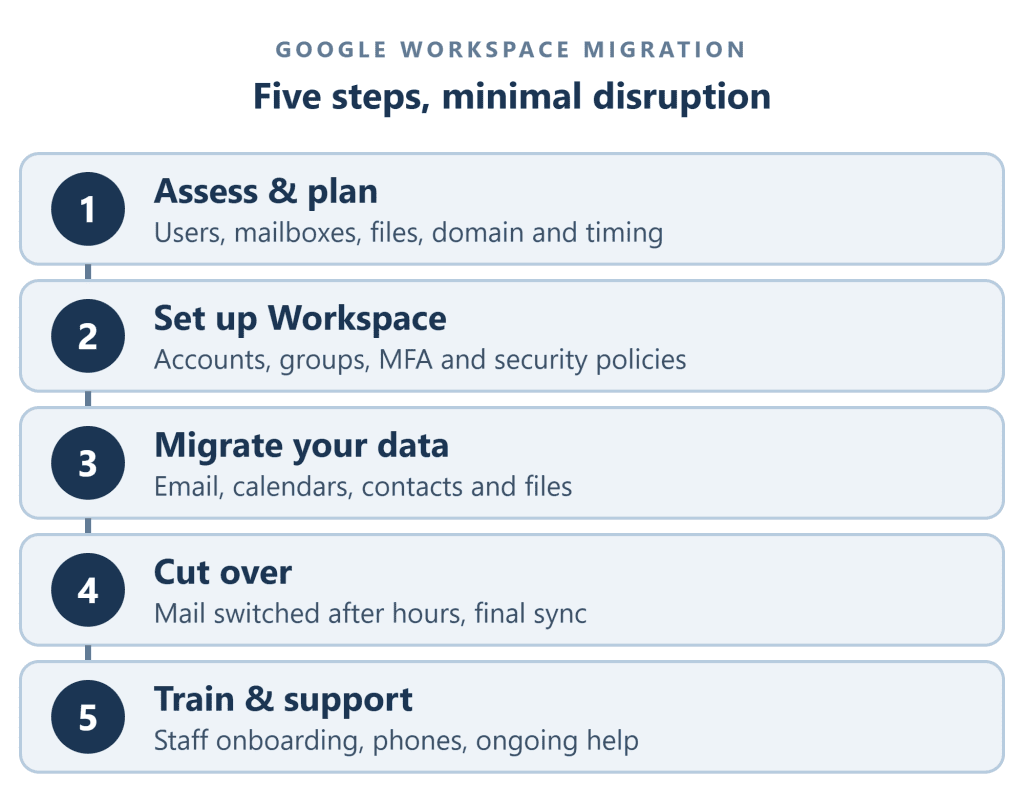
Careful planning and testing help ensure a smooth migration experience. Data is copied in the background while staff keep working, and the final switch of your email is scheduled after hours so nothing is lost and your team starts the next morning in the new system.
Support is available for:
- New user onboarding and setup
- Password resets and login issues
- Gmail troubleshooting and mailbox management
- Google Drive and Shared Drive permissions and sync issues
- Phone, tablet and Outlook setup for Google Workspace
- Google Meet and Calendar configuration
- Licensing changes and renewals
- End-user assistance and training
Google Workspace or Microsoft 365?
Both are excellent platforms, and the right choice depends on how your team works. Google Workspace shines for browser-based, mobile and field teams that value simplicity and real-time collaboration. Microsoft 365 is often the better fit for offices built around Windows PCs and desktop Office applications. Aspyn supports both, so we can give you an honest recommendation, and help you move between them if your needs change.
For organizations that value flexibility, ease of use, and strong collaboration tools, Google Workspace provides a reliable cloud solution that keeps teams connected and productive from anywhere.
Need help with setup, migration or management of Google Workspace for your Nanaimo Business?
Aspyn Information Services can help!